⚠️ TESTNET - Visit soltokenburner.com for Solana Mainnet
Solana Token Burner
NOTE: This Action Cannot be Reversed
1. Enter the Token Account
2. The Token Address and Decimals will be auto-filled
3. Enter the Amount of Tokens to Burn
Burn Solana SPL or LP Tokens
Autofill
Autofill
Max
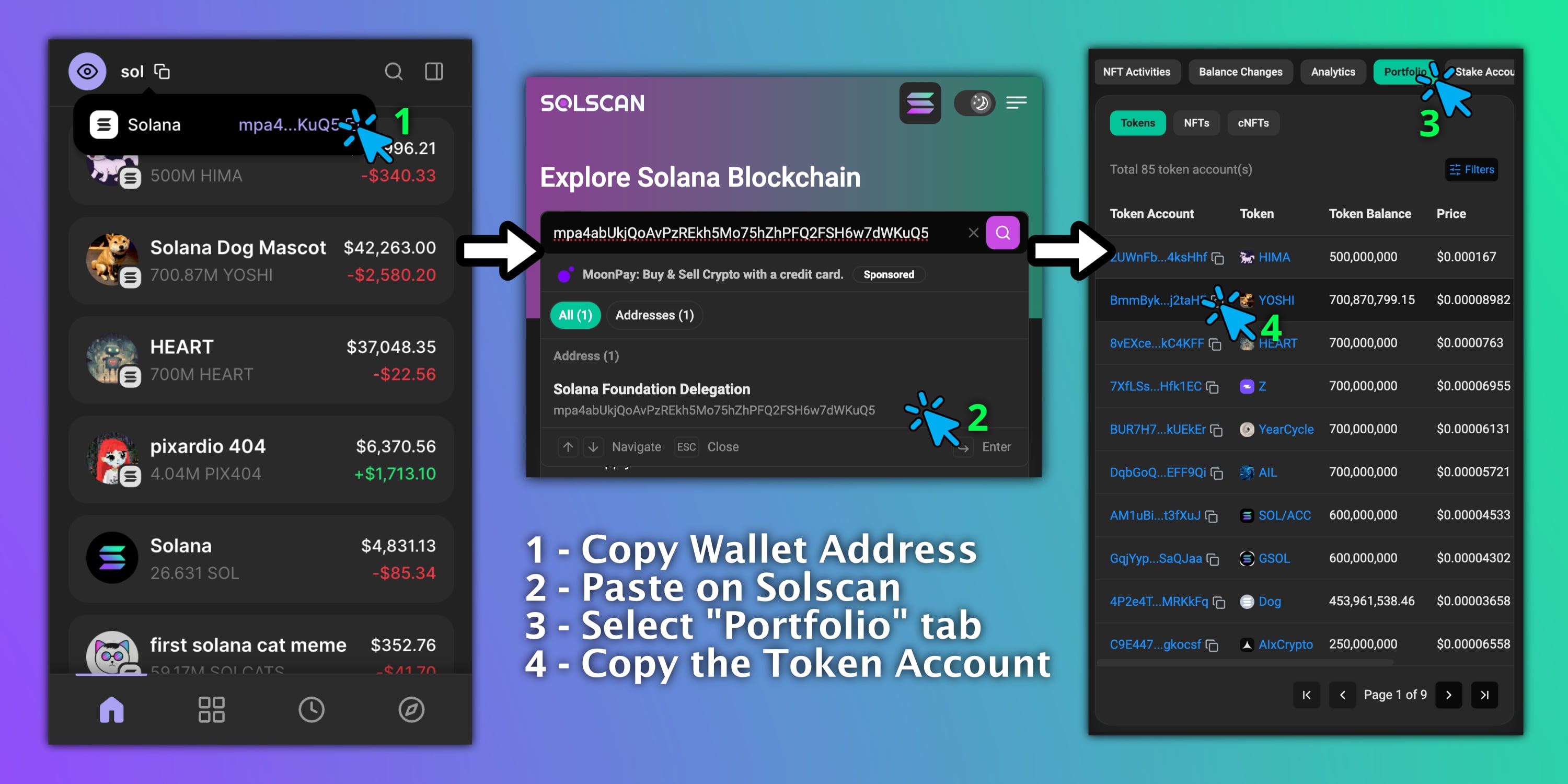
How to Obtain Token Account
FAQ
Yes. SolTokenBurner supports partial burns. Select “Input Amount to Burn,” enter your desired amount, and confirm the transaction.
Yes. All burns on Solana are irreversible. Please double-check the token and amount before confirming.
After completing a burn, go to SolScan and search for your wallet address. Your most recent transaction will display the on-chain burn details.
No. Partial burns do not close your token account, so the associated SOL rent is not refunded.
Yes. All burns are executed directly on-chain from your connected wallet, no third-party trust is required.
Tutorials are available in the menu, including both a detailed written guide and a YouTube walkthrough.